§20 MANAGE_ALERTS¶
OVERVIEW¶
A Tapeboard alert is a rule: symbol + condition + threshold, plus how often it should speak (cadence) and where it should reach you (channel). Rules live on the server, evaluate against the live quote feed ~once a minute during market and extended hours, and write into your notification inbox when they fire.
THE ALERTS PAGE¶
There are two screens with the word "alerts" stamped on them and they do different jobs:
- ALERTS (sidebar /
/settings/alerts) — your rules: create, view, delete, and when each last fired. - Settings → Notifications — your delivery: master mute, which channels light up per alert kind, quiet hours, push enablement.
 The alerts manager — rules, cadence, and last-fired state
HOW TO USE¶
Creating an alert¶
From /settings/alerts (or a chart right-click):
- Symbol — the ticker.
- Type — price above / below, percent change, or volume above.
- Value — the threshold.
- Cadence — once, once a day, or every time (below).
- Create.
The rule lands in the Active list instantly.
Template chips on the form ("Big move", "Breakout", "Volume spike") fill in type + value + cadence for you — they're there to teach the cadence idea by example, not to lock you in.
CADENCE (PER RULE)¶
| Cadence | Behavior |
|---|---|
| Once | Fires once, then disables itself. Default. Best for breakout levels you only need to hear once. |
| Once a day | Fires at most once per day (per market day, ET) when the condition is true; re-arms at tomorrow's open. The "tell me over the weekend if it dived Friday & Monday" mode. |
| Every time | Re-fires whenever the condition holds while the evaluator runs (about once a minute in session; device pushes are additionally throttled so a flapping cross doesn't hammer you). |
A gold "Triggered" chip appears on a fired row; the cadence chip ("daily"/"every") sits beside it, and the last-fired timestamp is on the row.
DELIVERY CHANNELS¶
(Settings → Notifications)
Per alert kind you choose where it lands — in-app inbox, device push, email (email is on by default only for price alerts). The kinds: price alerts, halts, scanner movers on your watchlist, earnings results, earnings reminders, daily digest, simulator fills, simulator summary, news, economic releases, options flow.
- Mute everything — one switch. Nothing reaches you except halt warnings (those are urgent: someone is losing money).
- Quiet hours — a real persisting window (start/end/your tz). Inside it, events land in your inbox but don't ping your device.
- Push — device notifications that arrive even when the site is closed. Enable from the Notifications page or answer the nudge when you create an alert / close your first sim fill.
The inbox at /notifications keeps the full history (per-row mark-read, clear, delete).
The bell icon in the header shares its count with the inbox — one number, one stream.
ALERT TYPES¶
| Type | Fires when |
|---|---|
price_above |
Last trade > your level |
price_below |
Last trade < your level |
pct_change |
Session Δ% ≥ threshold (either direction) |
volume_above |
Session volume > threshold (shares) |
vix_above |
VIX prints above your level |
indicator_cross |
Indicator-price cross (set via the technical builder on the manage page) |
Multi-condition patterns (MA crosses, RSI, trendlines, formula) live in the builders lower on the manage page and run on the same cadence machinery.
HOURS & TIERS¶
- Evaluation runs during regular + extended market hours (04:00–20:00 ET weekdays). Overnight/weekend rules don't spam you.
- Free: 3 concurrent rules. Pro/Terminal: unlimited.
- Sound alerts (in-browser chimes/beeps) stay Pro-gated.
-Notification Preferences¶

-Add Alert¶
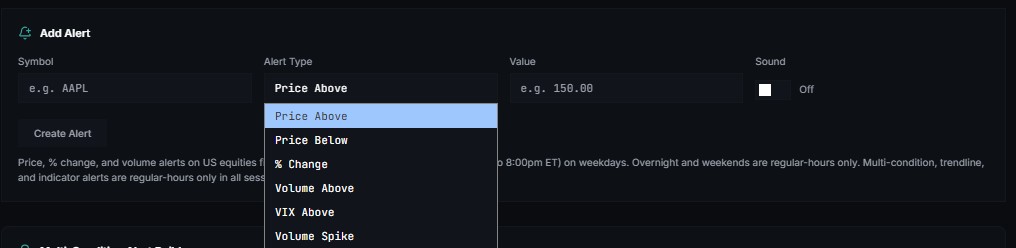
Alert Types Reference Guide
dropdown menu
| Alert Type | Description | Common Use Case |
|---|---|---|
| Price Above | Triggers an alert when the asset's market price crosses above a user-defined threshold. | Identifying breakouts or key resistance levels being broken. |
| Price Below | Triggers an alert when the asset's market price drops below a user-defined threshold. | Identifying breakdowns, potential buy zones, or support level failures. |
| % Change | Triggers an alert when the price shifts by a specific percentage (positive or negative) within a given timeframe. | Tracking intraday volatility or significant news-driven price moves. |
| Volume Above | Triggers an alert when trading volume exceeds a predefined baseline or specific number of shares/contracts. | Confirming the strength behind a price move or identifying unusual institutional activity. |
| VIX Above | Triggers an alert when the CBOE Volatility Index (VIX) crosses above a specific level. | Monitoring broad market fear, hedging portfolio risk, or timing option premium spikes. |
| Volume Spike | Triggers an alert when there is a sudden, sharp surge in trading volume relative to recent historical intervals. | Spotting algorithmic execution, stop-loss cascades, or immediate news reactions. |
Create Alert
Price, % change, and volume alerts on US equities fire pre-market (4:00am ET) through after-hours (to 8:00pm ET) on weekdays. Overnight and weekends are regular-hours only. Multi-condition, trendline, and indicator alerts are regular-hours only in all sessions.
-Multi-Condition Alert Builder¶


Webhook URL (optional) https://hooks.example.com/... Optional — Tapeboard POSTs a signed JSON payload here when this alert fires (Zapier, Discord, n8n, custom bots).
Example
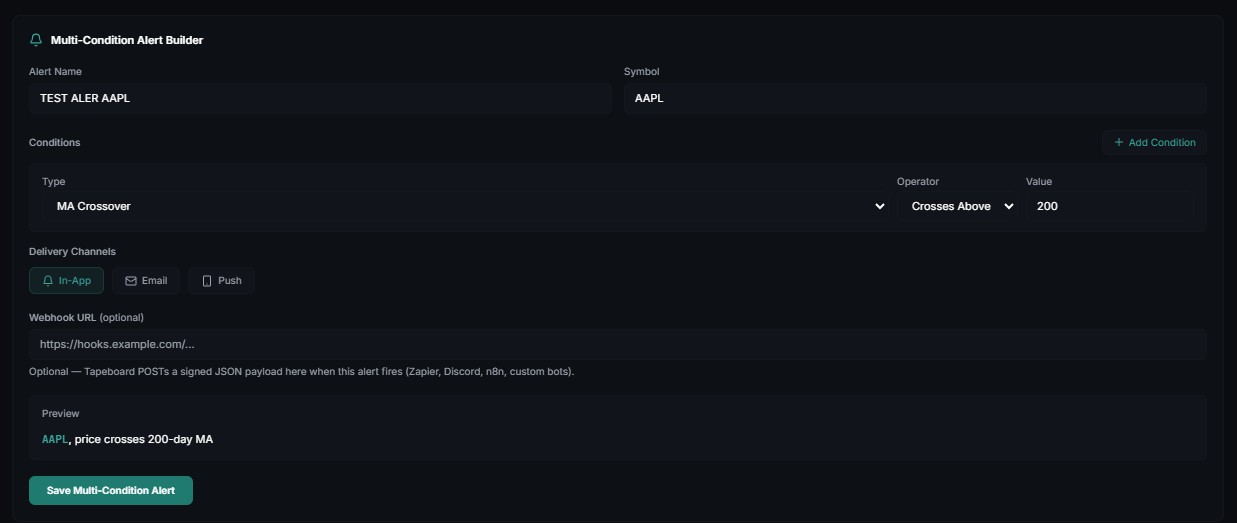 Preview
AAPL, price crosses 200-day MA
Preview
AAPL, price crosses 200-day MA
--Alert Types¶
The following table outlines the supported alert trigger conditions (Types) and their typical use cases in market monitoring.
| Alert Type | Description | Primary Use Case |
|---|---|---|
| Price Above | Triggers when the asset price rises past a specified threshold. | Breakout tracking, resistance level monitoring. |
| Price Below | Triggers when the asset price drops below a specified threshold. | Support level monitoring, stop-loss planning. |
| % Change Threshold | Triggers when the asset's percentage price change over a given period exceeds a threshold. | Volatility monitoring, sudden pump or dump alerts. |
| Volume Above | Triggers when the trading volume exceeds a predefined level. | Confirming trends, identifying unusual market activity. |
| RSI Overbought (>) | Triggers when the Relative Strength Index (RSI) exceeds a specific overbought value (typically >70). | Identifying potential trend reversals or overextended markets. |
| RSI Oversold (<) | Triggers when the RSI falls below a specific oversold value (typically <30). | Identifying potential buying opportunities or oversold conditions. |
| MACD Crossover | Triggers when the MACD line crosses the Signal line. | Momentum shift detection and trend continuation signals. |
| MA Crossover | Triggers when a shorter-term Moving Average crosses a longer-term Moving Average. | Identifying golden crosses (bullish) or death crosses (bearish). |
--Conditional Operators¶
Operators define the mathematical or logical relationship required to trigger the selected alert type.
| Operator | Name | Trigger Logic Description |
|---|---|---|
> |
Greater Than | Triggers if the current value remains strictly above the threshold. |
< |
Less Than | Triggers if the current value remains strictly below the threshold. |
>= |
Greater Than or Equal To | Triggers if the current value is equal to or higher than the threshold. |
<= |
Less Than or Equal To | Triggers if the current value is equal to or lower than the threshold. |
Crosses Above |
Crosses Above | Triggers specifically at the precise moment the value transitions from below to above the threshold. |
Crosses Below |
Crosses Below | Triggers specifically at the precise moment the value transitions from above to below the threshold. |
--Delivery Channels & Configurations¶
Alert notifications can be routed through multiple endpoints concurrently:
- In-App: Real-time push notification or notification tray item within the application dashboard.
- Email: Sent directly to the registered user's email address.
- Push: Mobile push notifications for real-time mobile device alerting.
- Webhook URL (Optional): Sends a structured JSON POST payload to a custom external endpoint (e.g., Slack, Discord, or automated trading bots) when the condition is met.
-Indicator Alert¶
e.g. RSI(14) crosses above 70, EMA(9) crosses above EMA(21)
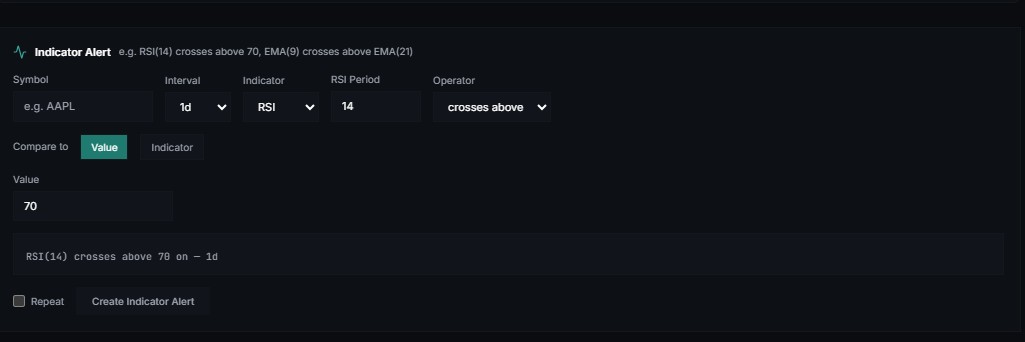
🔔 Indicator Alert Configuration Guide
The interface allows a trader to construct logical condition alerts based on real-time price data and indicators. Below is the full breakdown of configurable form options:
| Parameter Field | Control Type | Input / Selectable Options | Description |
|---|---|---|---|
| Symbol | Text Input | e.g., AAPL | The stock or asset ticker symbol to monitor. |
| Interval | Dropdown | 1m, 5m, 15m, 30m, 1h, 1d |
The chart time frame intervals used to evaluate the alert logic. |
| Indicator (Primary) | Dropdown | SMA, EMA, RSI, MACD, Stoch, ATR |
The primary technical metric acting as the condition base. |
| Operator | Dropdown | crosses above, crosses below, >, < |
The logical relationship operator that triggers the alert state. |
| Compare to | Toggle | Value / Indicator |
Sets whether the primary indicator condition is evaluated against a fixed numerical level or another dynamic indicator curve. |
| Repeat | Checkbox | True / False |
Determines if the alert remains active for multiple triggers or disarms after the first instance. |
--Technical Indicators¶
| Indicator | Full Name | Common Technical Use Case |
|---|---|---|
| SMA | Simple Moving Average | Identifying support/resistance levels and overall trend direction over a set period. |
| EMA | Exponential Moving Average | Tracking price trends with a higher sensitivity to recent price movements. |
| RSI | Relative Strength Index | Measuring the speed and change of price movements to identify overbought or oversold conditions. |
| MACD | Moving Average Convergence Divergence | Detecting changes in the strength, direction, momentum, and duration of a trend. |
| Stoch | Stochastic Oscillator | Comparing a specific closing price of an asset to a range of its prices over a certain period. |
| ATR | Average True Range | Measuring market volatility by decomposing the entire range of an asset price for that period. |
--Conditional Operators¶
Operators define the specific cross or threshold logic required to trigger an action or alert based on the selected indicator.
| Operator | Type | Logic Description |
|---|---|---|
| crosses above | Crossover | Triggers at the exact moment the indicator line cuts upward through a specific value or secondary line. |
| crosses below | Crossover | Triggers at the exact moment the indicator line cuts downward through a specific value or secondary line. |
| > | Greater Than | Triggers and remains active as long as the indicator value is strictly higher than the threshold. |
| < | Less Than | Triggers and remains active as long as the indicator value is strictly lower than the threshold. |
--Compare to¶
Depending on the selection made under "Compare to", the interface structurally updates with appropriate secondary parameter boxes:
Option A: Static Level Configuration (Compare to: Value)
- Value Box: Numerical entry threshold (e.g.,
70for an overbought RSI evaluation). - Formula Output Example:
RSI(14) crosses above 70 on - 1d
Option B: Cross-Indicator Configuration (Compare to: Indicator)
- Target Indicator Dropdown:
Price,SMA,EMA,RSI,MACD,Stoch,ATR - Target Period Box: Contextual integer entry box defining the length for the target indicator (e.g.,
20for anEMA(20)cross). - Formula Output Example:
RSI(14) crosses above EMA(20) on - 1d
Example Rules Supported
- RSI Overbought Scan:
RSI(14) crosses above 70on a1dtimeframe. - Moving Average Crossover:
EMA(9) crosses above EMA(21)on shorter intraday parameters like5mor15m.
Active Alerts¶
Multi-Condition Alerts¶
Trendline Alerts¶
Indicator Alerts¶
Alert History¶
TROUBLESHOOTING¶
"It fired but I didn't get a push."
Settings → Notifications shows the push badge state. If unsubscribed, enable push there. If you're over your 3-per-day scanner cap, further mover events collapse into a single inbox row — not silence, just less noise.
"My quiet-hours change didn't stick last month."
That was us — the old control talked to localStorage only. It saves to your account now (verified 2026-09-01).
"Too many scanner notifications."
Lower the volume in Settings → Notifications by turning Watchlist movers off for push (keep in-app), or use Symbol mute on push. The hard ceiling is 3/day for scanner pushes (how scanner alerts work); inbox grouping covers the rest.
Desktop notifications never show.
Browser OS-level permission: chrome://settings/content/notifications → Allow tapeboard.com.
Sound silent.
Browser autoplay locked until first interaction on the page — click once, then it works. Or the M key on /scanner.
RELATED¶
- Scanner — the panels these chimes come from
- Chart right-click alerts — fastest way to set a level
- Simulator — fill/summary notifications channels follow the same matrix