§15 SEC_FILINGS¶
OVERVIEW¶
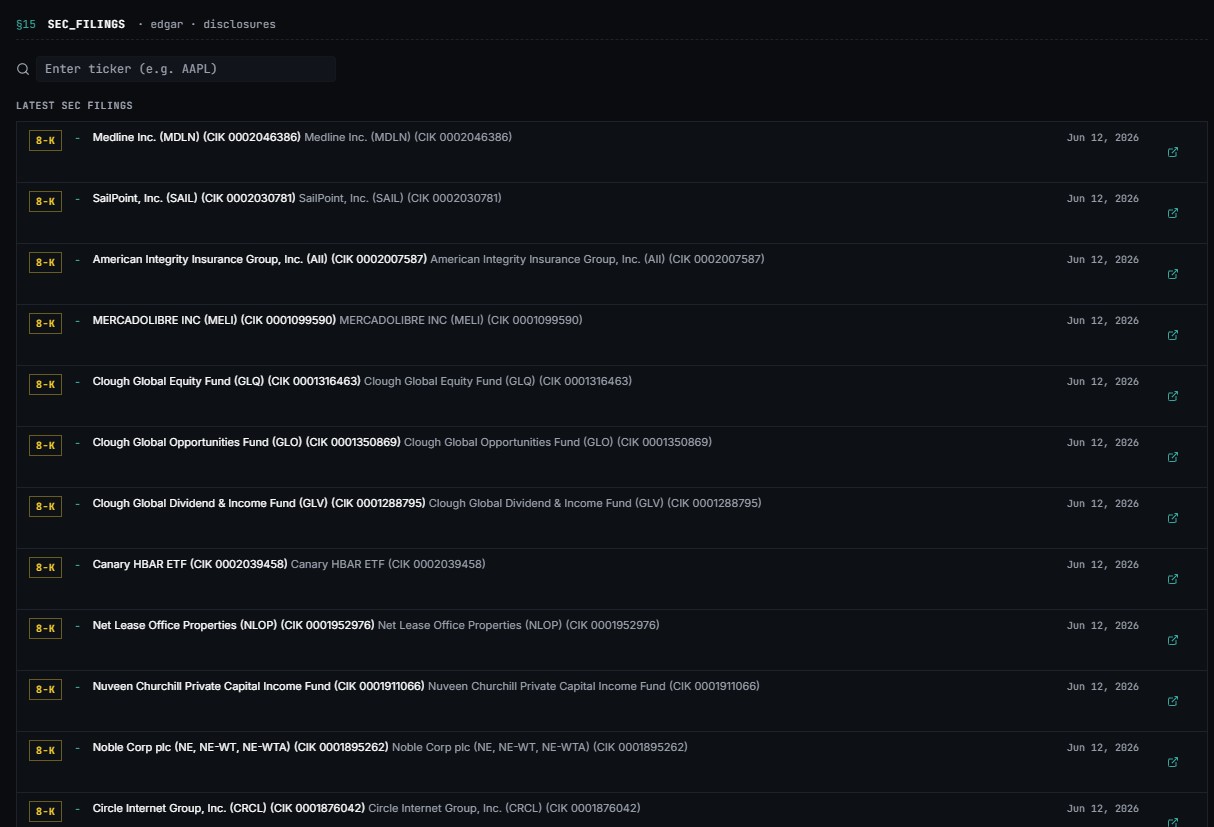
SEC Filings is the EDGAR window inside Tapeboard. Search any US-listed ticker to view its complete filing history, or browse the cross-market Latest SEC Filings feed when no ticker is loaded.
Public companies report every material event to the SEC: quarterly numbers, mergers, executive changes, insider trades. The Filings page lists them by company, filters them by form type and opens each one in a reader inside Tapeboard. On Pro, an AI summary tells you what a filing says in a few lines.
Filings come directly from official SEC submissions. Tickers resolve automatically to their SEC company record. Major filings (10-K, 10-Q, 8-K, S-1) stack at the top of the per-ticker view; insider filings (Form 3, Form 4) collapse into their own expandable section below.
Paths
/filings— search + cross-market feed (no ticker loaded) or per-ticker view (ticker loaded)/filings/today— Filing of the Day (see its own guide)/filings/:filing_id— single-filing detail (the link every digest email uses)/viewer/:cik/:accession— in-app document reader
FEATURES¶
Cross-market feed¶
When no ticker is loaded, /filings shows the Latest SEC Filings feed — the freshest filings across the market, newest first, with type badges, tickers, and a last-updated stamp.
Filing of the Day¶
Filing of the Day is a separate page at /filings/today — it picks the one filing that mattered today. Each day Tapeboard picks one recent filing that looks most worth your time and shows it on its own page.
The card names the type of pick, such as 8-K MATERIAL EVENT, 8-K INSIDER FLAG, 10-Q SURPRISE or 13F PORTFOLIO SHIFT. It shows the company, a headline and a plain summary. Click the card to open the filing page, where you can add the ticker to a watchlist, save a thesis note or share it.
The pick comes from the last seven days of 8-K, 10-Q and 10-K filings. The summary is written from the filing's own item codes with a fixed template, not by AI. The pick is refreshed about every 90 minutes.
Per-ticker view¶
Enter a ticker to pull the company's filing history. The company header strip displays entity name, CIK, SIC code, and fiscal year end, with deep links to SEC.gov and the Tapeboard stock page.
Below the header:
- Filing timeline (a visual strip of the company's filing history; spots filing cadence or sudden silence at a glance)
- Earnings call transcript widget (latest earnings call transcripts, right under the timeline)
- Full-text search box (Terminal only)
- Bulk-summary panel for AI-summarising a stack of filings at once (Pro+)
The filing list is split into Major Filings (10-K, 10-Q, 8-K, DEF 14A, S-1, 13F) and a collapsible Insider Filings section (Form 3 & 4, with a live count badge).
In-app reader¶
Any filing opens inside Tapeboard at /viewer/:cik/:accession — the raw EDGAR document, pinned to light mode for readability, no PDF download, no leaving the app. Every filing row also links to its detail page, which carries the document viewer, the AI summary (when unlocked), and a public share link that opens the same summary for anyone — no account needed on their end.
Sharing a filing¶
Open a filing's page from Filing of the day or from a shared link. Click Share — the link is copied. The person who opens it can read the filing and its summary without an account.
Type filters¶
Filter the filing list using the type pills:
All 10-K 10-Q 8-K DEF 14A S-1 13-F Form 3 Form 4
Selecting a pill scopes both the major-filings table and the insider section.
Filing categories¶
| Form | Category | Description |
|---|---|---|
| 10-K | Major | Annual report |
| 10-Q | Major | Quarterly report |
| 8-K | Major | Material event — guidance, M&A, executive changes, etc. |
| S-1 | Major | IPO registration or secondary offering |
| DEF 14A | Major | Definitive proxy statement |
| 13-F | Major | Institutional holdings (>$100M AUM, quarterly) |
| Form 3 | Insider | Initial statement of beneficial ownership |
| Form 4 | Insider | Changes in beneficial ownership (insider buy/sell) |
Filing row fields¶
| Column | Description |
|---|---|
| TYPE | Form badge — 10-K, 10-Q, 8-K, etc. |
| DATE | Filing date (when the company filed with the SEC) |
| PERIOD | Period of report (the quarter or year the filing covers) — hidden below 640 px |
| DESCRIPTION | Primary-document description; for 8-Ks the relevant items append underneath |
| ACTIONS | SEC.gov external link + AI summary trigger (Pro+) |
AI summaries¶
Click the AI button on any filing row to open a slide-out plain-English summary. Summaries surface risk factors, segment economics, and key disclosures buried in lengthy MD&A sections. 10-K and 10-Q summarise best. A bulk panel summarises the latest filing batch for the ticker you are on. Every summary is saved in AI history.
Note
AI summaries require Pro and count against your daily quota — 20 per day on Pro, unlimited on Terminal.
HOW TO USE¶
Browse the cross-market feed
- Open
/filingswith no ticker loaded. - The Latest SEC Filings feed appears — the freshest filings across the market, newest first.
- Click Load More to page through additional results.
Research a specific company
- Click Filings in the sidebar.
- Type a ticker in Enter ticker (e.g. AAPL) and pick it from the list.
- The company's name, CIK number and links to SEC.gov and its stock page appear, with a timeline of its filings.
- Below that, the Major Filings table lists each filing with its type, date, period and a short description. Filings from insiders (Form 3 and Form 4) sit in a collapsed Insider Filings group.
- Use the type pills to filter by form type.
- Click any row to open its detail page — document viewer, filed date, form type, and (on Pro) the AI summary button.
- Click the AI button (Pro+) to open a slide-out summary of that filing.
- Use the header's Stock Page link to jump to
/stock/:symbol— filings in one hand, price action in the other.
Tip
On mobile, tap the … button on any row to open a bottom sheet with the same SEC.gov link and AI summary actions.
Bulk-summarise a filing stack (Pro+)
- Load a ticker and scroll to the bulk-summary panel below the company header.
- Select the filings to summarise.
- Run the batch — summaries generate against your AI quota.
Tip
The last-searched ticker persists in localStorage. Your previous company loads automatically on your next visit.
WHEN TO USE IT¶
| Situation | Action |
|---|---|
| A price moves and the news wire is silent | Open the 8-K — a contract win, a CEO exit, a debt raise. Check filings before you trust a headline |
| An 8-K just hit the tape | Open the filing immediately to read the disclosed event |
| Earnings just dropped | Pull the 10-Q for the period detail — it drops days before some coverage hits |
| Quarterly earnings prep | Read the 10-K before the analyst call even starts |
| New position due-diligence | Run the 10-K for the business, the 13F for which funds hold it, and the Form 4s for what insiders actually did with their own money |
| Dilution watch | Filter to S-1 — shelf registrations mean shares are coming; read the overhang before you buy a "cheap" print |
| Deep fundamental research | Open the 10-K — use the AI summary to surface risk factors and segment economics |
| After the close | Sweep the cross-market feed — most material filings drop between 4:00 and 6:00 PM ET |
LIMITS¶
| Item | Limit |
|---|---|
| Free tier — per-ticker filing history | Last 10 filings |
| Pro / Terminal — per-ticker filing history | Full history |
| Cross-market feed — lookback window | Latest filings across the market |
| Cross-market feed — row cap | 30 rows |
| Cross-market feed — page size | 20 rows (Load More) |
| AI quota — Pro | 20 summaries per day |
| AI quota — Terminal | Unlimited |
| Full-text search | Terminal only |
| Foreign issuers (20-F, 6-K) | Not in type-pill list — use All to surface them |
| Earnings call transcript coverage | Mostly US-listed mid/large caps |
| Feed update latency | Typically within minutes of SEC posting |
Note
/filings/today is the Filing of the Day page — a separate curated pick, not a redirect to /filings.
TROUBLESHOOTING¶
No company found for ticker "XXX"
The ticker is not in SEC's company list. Common causes:
- ADR ticker variant — try the underlying security's ticker
- Delisted symbol
- Pre-IPO company not yet registered with the SEC
- Foreign issuer filed under a different identifier
Use the All type pill to ensure no filter is hiding the results. If the company files 20-F or 6-K forms, those do not appear in the type-pill shortcuts — switch to All to see them.
Only 10 filings show
That is the free-account limit. Upgrade to Pro or Terminal for full filing history.
The AI button does nothing
AI summaries require Pro.
A row has no open icon
The filing has no readable document. Use the SEC.gov link on the company header instead.