§24 SIMULATOR¶
OVERVIEW¶
The Simulator is a flight simulator for trading. You place real orders, against real prices, with real consequences for your account balance — except the money is fake, so every lesson is free. The formal name for this is paper trading: each buy and sell is matched against the live market (or a replay of it), but it books to a practice account instead of a brokerage account. Nothing here can cost you a dollar. That's the point. This is where you're supposed to discover that shorting that $2 stock at 3:47pm felt obvious and wasn't.
The whole desk is free and one keystroke away: ⌘6, or SIMULATOR in the sidebar. Pro and Terminal add instruments around the desk — Level 2 viewing, bracket orders, walk-book fills, CSV export — but the simulator itself, its six standard order types, replay, and hotkeys cost nothing. The tier table has the exact split.
If you're brand new: Getting started covers the account basics, and the Scanner guide covers how to find something worth practicing on. This guide assumes zero trading experience and explains every term inline.

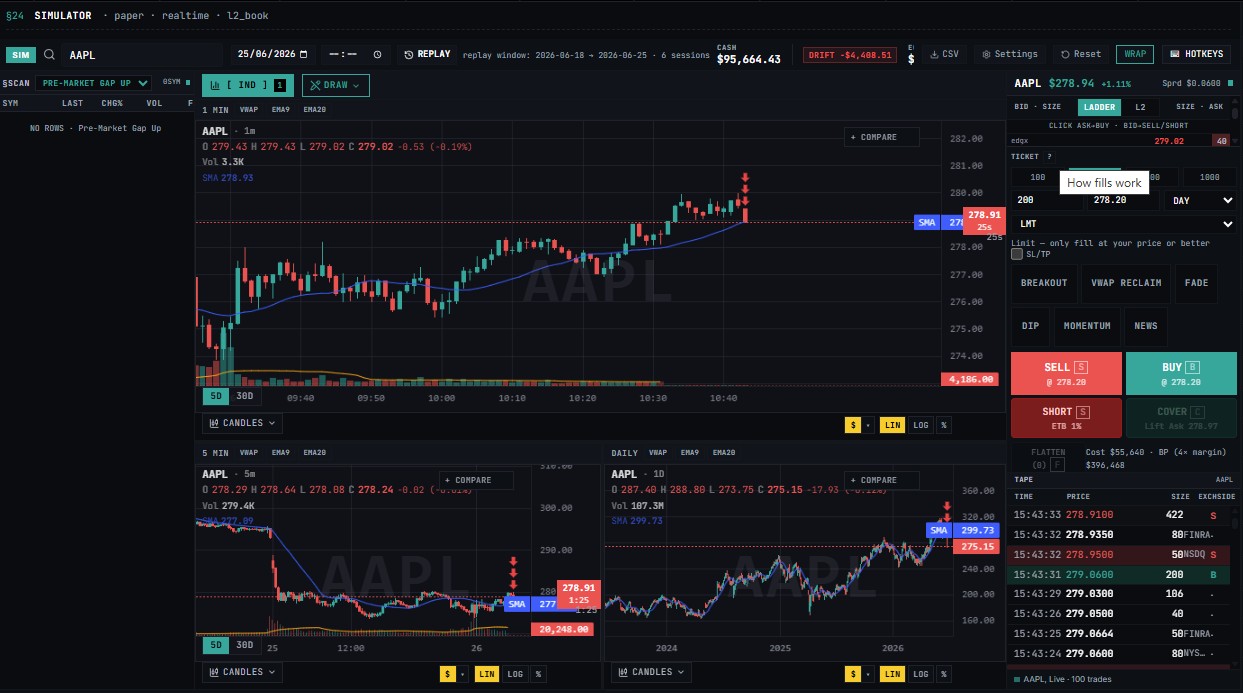
The full simulator desk on desktop: top bar with ticker search, account chip and session stats; left column a compact movers list; center a green-and-red candlestick chart of AAPL with a 1 MIN pane above 5 MIN and DAILY panes; right column the Level 2 order book ladder with an order ticket underneath; bottom a blotter with Positions and Orders tabs
YOUR FIRST THREE MINUTES¶
Open the Simulator (⌘6, or /simulator). Your very first visit opens a small modal: Set your starting balance.
The starting-balance picker, shown via the RESET dialog: title Reset paper trading account?, a warning that positions, orders, and paper-trade history clear while real imported trades are preserved, five preset buttons for 5,000 / 10,000 / 25,000 / 50,000 / 100,000 dollars, a custom amount field, a confirm checkbox, and a red Reset Account button beside Cancel. The first-visit dialog shows this same picker under the title Set your starting balance with a Start Trading button
Pick your starting balance. Presets run $5,000 / $10,000 / $25,000 / $50,000 / $100,000, or type any number you want. $25,000 is the default. The modal's own advice is the right advice: pick something realistic to your actual account size — if you'd fund $5k, practice with $5k, so the position sizes you rehearse are the ones you'd actually place.
The same picker lives behind the RESET button in the top bar whenever you want a fresh start. RESET clears positions, orders, and history — your chart drawings and alerts survive it.
Click Start Trading. You land on the desk with that balance loaded. The top bar tracks BP Avail (buying power) plus your session stats as you trade; on a phone, the ACCT chip opens the full account sheet.
Load a ticker. Click the Ticker... box at the top of the page, type a symbol (say AAPL), and press Enter. The chart, order book, and ticket all switch to it. Or bring one over from the scanner with one click.
Place a trade. In the order ticket on the right: quantity 100 (tap a quick-size chip), order type MKT, then BUY. A toast confirms the fill price, the account chip flashes green, and a position row appears in the Positions blotter below.
Close it. Hover the position row and hit SELL ALL (or press F). The trade books to history with its P&L net of fees, and — signed in — into your journal too.
That's the whole loop: find it, trade it, review it, repeat tomorrow. Everything below is that loop with the training wheels explained.
Tip
Want it walked for you once? ?tour=first-trade on the URL (or the practice-position step in the new-account onboarding) launches a five-step guided first trade — PICK A SYMBOL → SET SHARES → PLACE THE BUY → SEE YOUR P&L → IT AUTO-LOGGED — with a coach-mark pointing at each control before you touch it. Run it once and the desk stops being a wall of panels.
PLACING A TRADE¶
The order ticket is the vertical panel on the right, under the Level 2 ladder. A trade is four choices: which stock, which direction, how big, and which order type.
The order ticket close-up: a QTY field with 100/200/500/1000 quick-size chips, an ORDER TYPE dropdown set to MKT, price and stop fields, and a 2x2 action grid with green BUY and red SELL on top and dark SHORT and COVER below, each button showing the ask or bid price it would fill at
The guided first-trade tour in progress: a STEP 4/5 SEE YOUR P&L coach-mark floating over the lower right of the desk, explaining that the Total P&L in the top bar updates in real time, with a NEXT button beneath it
- Load a symbol: type it in the top search bar or click a scanner row (row anatomy explained there). The chart, book, and ticket sync to it. Clicking an ask line in the Level 2 ladder arms the ticket to buy at that price; clicking a bid line arms it to sell there.
- Pick a side: Four buttons, and they pair off:
- BUY opens a long position (you own shares and profit if the price rises). SELL closes it.
- SHORT opens a short position. COVER closes it.
- On the ticket: set quantity (type, or use the quick-size chips), pick an order type, and submit.
- The ticket shows the spread and estimated fill before you commit. Rejections say why — insufficient buying power, halted symbol, and so on.
ORDER TYPES¶
| Type | Tier | Behavior |
|---|---|---|
| Market | Free+ | Fills now against the realism model |
| Limit | Free+ | Rests until price reaches your limit; a limit priced through the market fills immediately |
| Stop | Free+ | Triggers a market-style exit; models gap-slippage (a $10 stop gapping to $9.50 fills at $9.50) |
| Stop-limit | Free+ | Stop arm, then converts to a limit |
| Trailing stop | Free+ | Rides the high/low-water mark by your offset |
| Take-profit | Free+ | Fills at your target |
| Bracket | Free+ | Entry + attached stop and target, OCO-linked (one fires, the other cancels) |
| OCO | Free+ | Two legs; the first to fill cancels the other |
Terminal adds true Level 2 walk-book fills (orders walk real depth instead of a modeled spread).
OPEN IT AND SET YOUR BALANCE¶
Path: /simulator
Shortcut: ⌘6 — or open it from the §TRADE group at the top of the sidebar (next to the Journal). You can also jump straight in from a free practice prompt on the Dashboard, Charts toolbar, and Scanner toolbar.
On first visit a setup modal asks for a starting balance. Pick a preset ($5K / $10K / $25K / $50K / $100K) or type a custom amount (minimum $100). The default is $25,000. The choice persists to your browser; signed-in users also get a server-backed portfolio so positions survive a reload and re-login.
The top bar shows live account stats: Cash, Equity, Day P&L (with %), BP Avail (buying power), and a Trades counter. A green Synced pill appears when your portfolio is backed by the server. The Reset button wipes positions, orders, and history and lets you choose a fresh balance (your realism settings are preserved across a reset).
First-run setup — pick your paper starting balance ($5K-$100K)
FEATURES¶
Blotter Tabs¶
| Tab | Purpose |
|---|---|
| Positions | Open positions with side, shares, avg entry, mark, unrealized P&L, and risk columns. Click SL / TP on a row to set protective exits; SELL ALL / COVER ALL flattens. |
| Orders | Every working (resting) order, with inline edit on unfilled orders and status chips (pending / queued / partial). |
| My Trades | Your own execution ledger (filled/cancelled/pending, filterable). |
| Options | Paper calls/puts with strikes, expiry, greeks, and assignment mechanics; shares the equity cash balance. |
| Review | Per-close journaling: tag the setup (breakout, VWAP reclaim, gap-n-go…), write notes, and see per-tag win rate / avg R / net P&L with the R distribution. |
| Journal | The trade journal panel, bridged from the same entries. |
| Analytics | Sharpe, Sortino, alpha, max drawdown, equity curve, per-symbol breakdowns; CSV export on Terminal. Shift+A toggles it fullscreen. |
The Orders tab is the working-orders blotter — every pending order with a sticky pinned header: Symbol, Type, Side, Shares, Details, Status, and a cancel control. The tab label shows the live pending count.
Inline editing. Any order with zero filled shares can be edited in place — click the pencil-cell to change shares, limit price, stop price, target price, or trail amount/percent. Edits save to your account instantly. Once a partial fill lands, the fields lock down (cancel-and-recreate is the only safe path for a partially-filled order). Status chips. Pending (amber), Queued (purple, with a queue-ahead share count for non-marketable limits), and Partial N% (green, with the filled/total share split and a running average fill price). OCO/bracket legs are tinted so you can see which orders are linked; when one leg fills or the position goes flat, its siblings auto-cancel.
Charting¶
The Simulator uses the exact same charting engine as the main Charts page: all 83 indicators and every drawing tool are available at every tier, including Free.
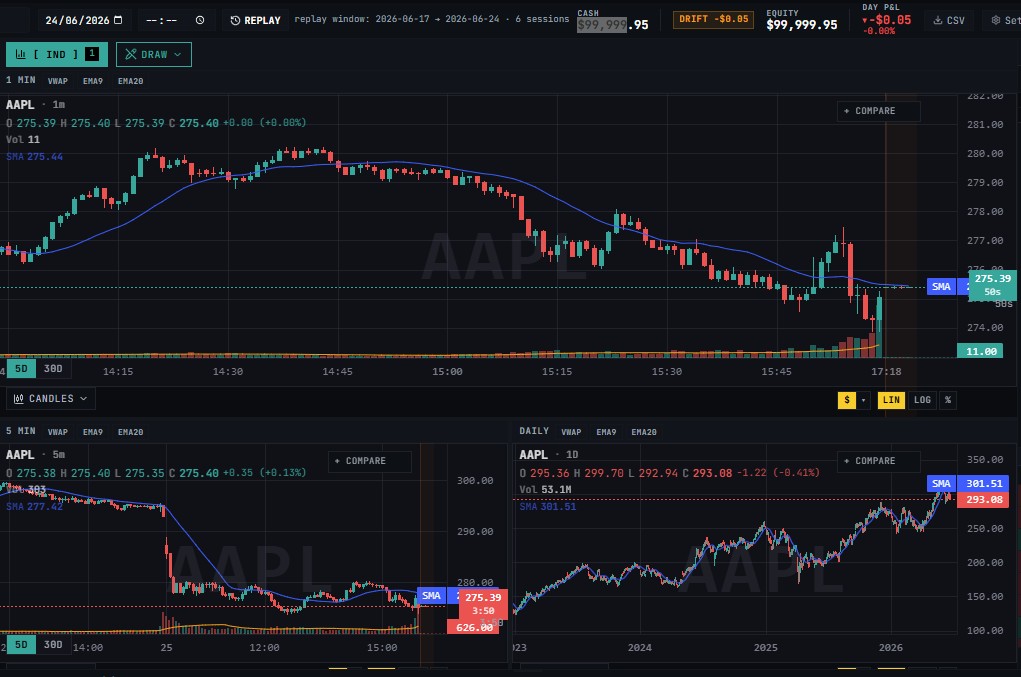
Execution-Realism Model¶
The realism layer is on by default at every tier and cannot be disabled. It covers:
- Spread crossing
- Slippage scaled off real traded volume
- SEC and FINRA TAF fees
- Configurable commissions
- Gap-slippage on stops
- Short-borrow carry
- SSR uptick rule enforcement
- Trading-halt blocks
- Buying power calculated on real margin math
Market Replay¶
Practice specific historical sessions — earnings gaps, halt-and-resume events, trend days — and trade them forward bar by bar without waiting for them to recur.
The top-bar transport lets you pick a symbol + date (and optional start time) and relive that session's 1-minute tape: play/pause, step, speed up to max, and a scrub slider. Orders, stops, and P&L run through the exact same path as live — you trade the day, not watch it. On mobile the same transport lives in a collapsible replay strip above the bottom nav.

Once selected you can play with different speed

DRIFT¶

CSV¶

SETTINGS¶
Realism settings
Tune how closely the sim mirrors a real broker. Changes save instantly.
 ¶
¶
CASH¶

Margin gets 4× intraday buying power (min $2k equity) and can short. Cash is 1× and can't short. Commission / share ($)
Flat per-share commission on every fill. Default 0 (retail equities are commission-free). Commission / trade ($)
Flat per-fill commission. Default 0. SEC + TAF fees
Apply regulatory fees on sells (SEC §31 + FINRA TAF). Tiny but real. Enforce legacy PDT rule
Off by default — the $25k PDT rule was eliminated 2026-06-04 (FINRA Rule 4210). Enable to simulate the old rule: block the 4th day-trade in a rolling 5 business days when equity < $25k (margin only).
Note: the PDT rule only applies to margin accounts, it has no effect on a cash account.
MARGIN¶

Margin gets 4× intraday buying power (min $2k equity) and can short. Cash is 1× and can't short. Commission / share ($)
Flat per-share commission on every fill. Default 0 (retail equities are commission-free). Commission / trade ($)
Flat per-fill commission. Default 0. SEC + TAF fees
Apply regulatory fees on sells (SEC §31 + FINRA TAF). Tiny but real. Enforce legacy PDT rule
Off by default — the $25k PDT rule was eliminated 2026-06-04 (FINRA Rule 4210). Enable to simulate the old rule: block the 4th day-trade in a rolling 5 business days when equity < $25k (margin only).
Reset¶
Reset paper trading account?
Clears all positions, orders, and history. Your alerts and chart drawings are kept. Choose a new starting balance:

WRAP¶
 ¶
¶
KEYBOARD SHORTCUTS¶
Scalper hotkeys The simulator registers global scalper hotkeys (ignored while you're typing in a field or a modal owns the keyboard; plain or Shift only — Ctrl/Cmd/Alt combos pass through to the browser):
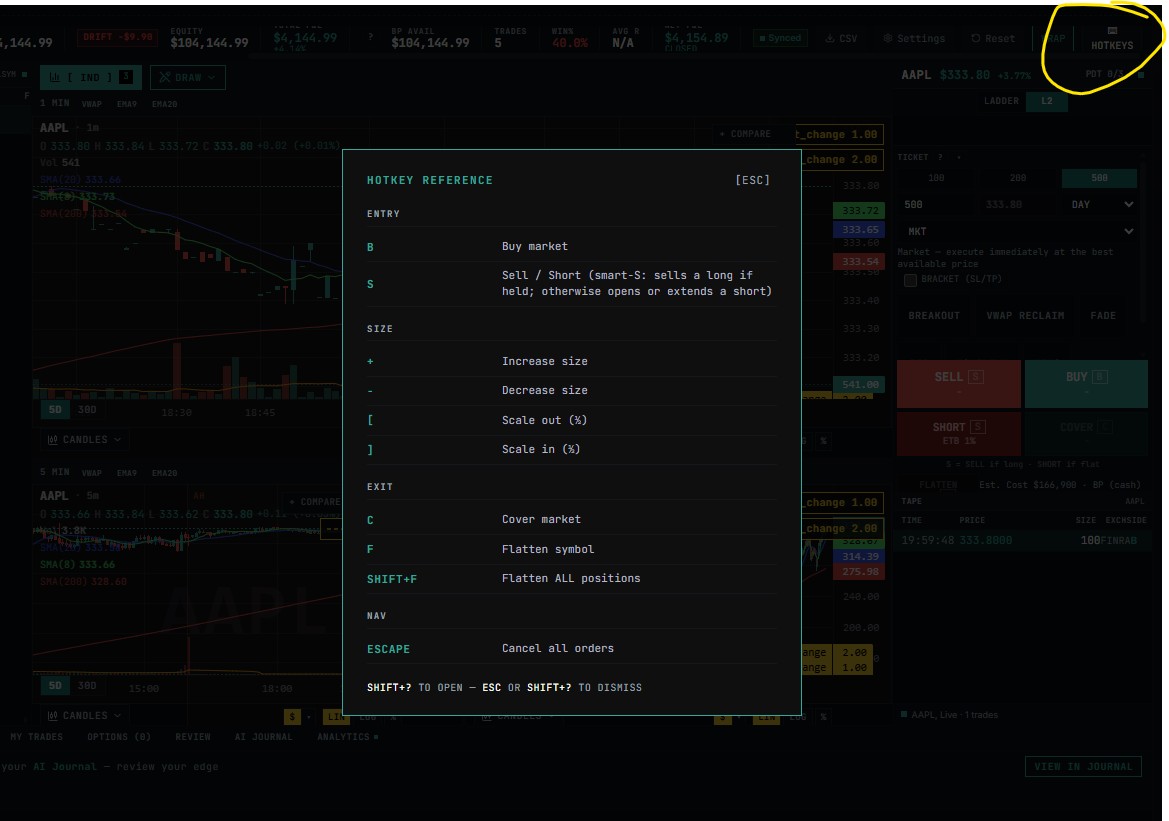
| Shortcut | Action |
|---|---|
| B | Buy market (open/extend a long). |
| S | Sell / Short market — Sell or Short, smartly: if you're long it sells (clamped to your held size); otherwise it opens/extends a short. |
| C | Cover market (never more than the open short). |
| F | Flatten symbol — Flatten the selected symbol's position. |
| SHIFT+F | Flatten ALL positions — Flatten all open positions (every long and short). |
| Escape | Cancel all orders — Esc (or Shift+C) — Cancel all pending orders. |
| + | Increase size — Increase order size by the step (default 100). |
| - | Decrease size — Decrease (floored at one step). |
| [ | Scale out (½) — close half the selected position. |
| ] | Scale in (½) — add half of your order size (buy if long/flat, add to the short if short). |
| PRESS [?] OR [ESC] | TO DISMISS |
Trading Journal Integration¶
Every closed trade auto-logs into your Trading Journal with its R-multiple, closing the practice-then-review loop automatically. Signed-in users' closes auto-log into the Trading Journal (deduped), so the loop from rehearsal to review is one click.
Tip
Use the Review tab to identify which setups are actually profitable across your paper-trading history. See journal.
LADDER¶
Price ladder view

L2¶
L2 bid ask view

Ticket¶
HOW FILLS WORK
LIMIT (maker)¶
Fills when price trades through your limit AND the queue ahead of you has been consumed. You pay no spread.
MARKET (taker)¶
Walks the book level by level, paying the spread and progressively worse prices as your size eats depth. Impact caps at ~1% per side.
THIN NAME¶
On sub