§25 INSIDER_ACTIVITY_SCREENER¶
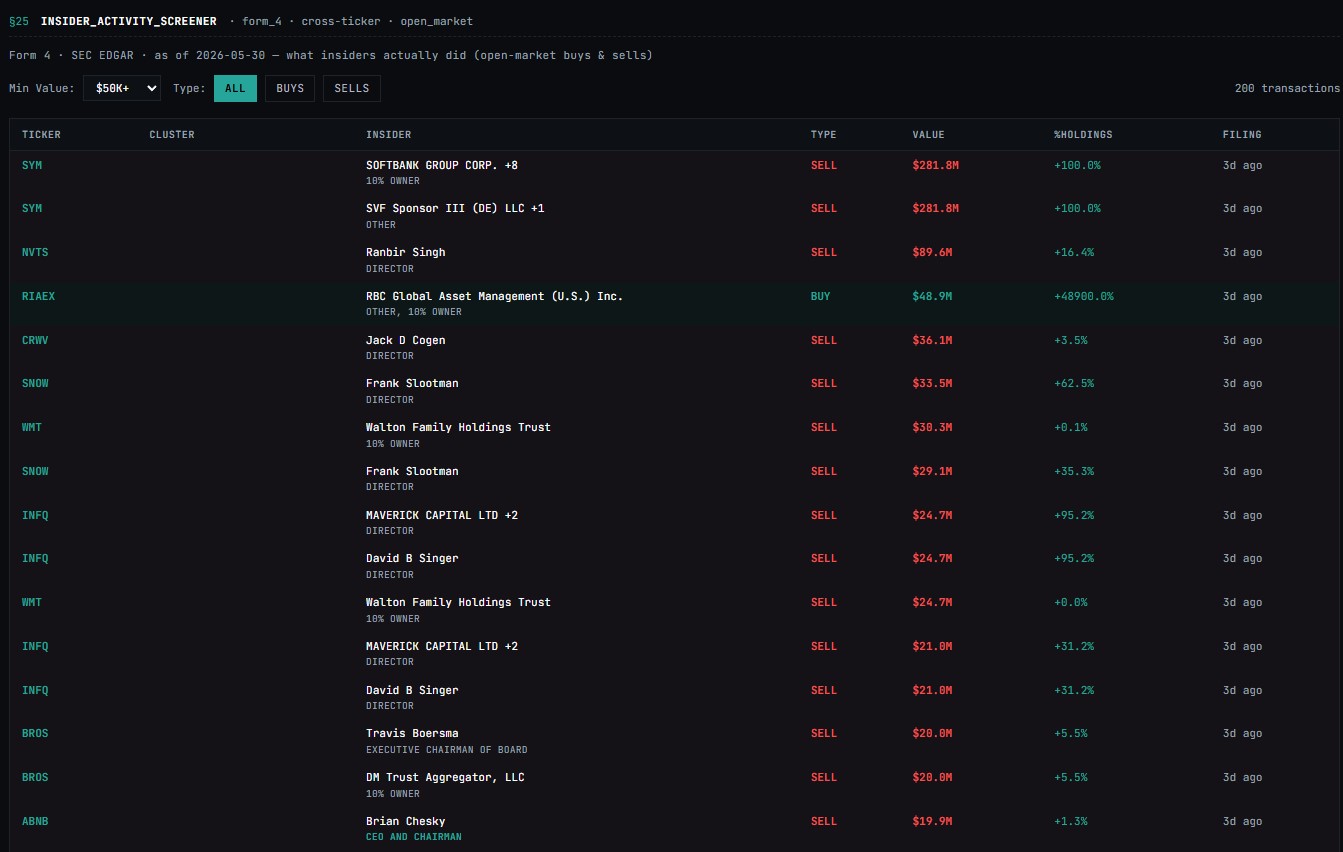
Insider Screener— Market-wide Form 4 transaction scanner filtered by value and transaction type.
URL:
tapeboard.com/insider-screener
Insider Screener ranks the largest recent Form 4 transactions across the US market, filterable by dollar value and direction — the cross-market view to the per-ticker insider tab on /research.
The Insider Screener ranks recent Form 4 transactions across the entire US market by dollar value, so you can see the biggest buys and sells without knowing the ticker in advance. Different from the Research insider tab, which shows Form 4 history for one symbol — this screener answers "who's putting size in across all my watched names today" in one table.
What it is¶
A market-wide insider-activity table. The page calls /api/insider-screener, which proxies FMP's /insider-trading feed (limit 50), and the client filters that result against the minimum-dollar-value and buy/sell-direction controls before rendering. Each row links to /research/
Buys are tagged by transaction code — anything containing purchase, buy, or starting with is treated as a buy and highlighted green; everything else is treated as a sell and highlighted red.
When to use it¶
Around earnings season to catch the open-window buys — insiders who load up immediately after the print are leaning into their own forward guidance with cash.
After a sharp drawdown to find the floor-hunters — cluster buys from a CEO and two directors at a 52-week low historically marks better entries than analyst upgrades.
On Friday afternoons to scan the late-week 10b-1 sale prints — heavy scheduled selling clusters can foreshadow gap-down Mondays.
Daily to log the largest insider buy of the day for your journal — over a quarter, the list becomes a useful watchlist of "company believes in itself" names.
Filter Bar¶
| Control | Options | Default |
|---|---|---|
| Min Value | $10K+ · $50K+ · $100K+ · $500K+ · $1M+ |
$100K+ |
| Type | ALL · BUYS · SELLS |
ALL |
Transaction count is displayed top-right (e.g. 0 transactions).
ALL¶
BUYS¶
SELLS¶
Results Table¶
| Column | Description |
|---|---|
SYMBOL |
Ticker of the company where the transaction occurred |
INSIDER |
Name and title of the reporting person |
TYPE |
Purchase · Sale · Option Exercise |
SHARES |
Number of shares transacted |
VALUE |
Total dollar value of the transaction |
FILING DATE |
Date the Form 4 was filed with the SEC |
Empty state: No recent insider transactions found.
Difference §RESEARCH → INSIDER¶
| RESEARCH / INSIDER | INSIDER SCAN | |
|---|---|---|
| Scope | Single ticker deep-dive | Full market sweep |
| Use case | Diligence on a name you already know | Finding new ideas via insider signal |
| Default filter | Chronological by ticker | Min value $100K+, ranked by recency |
How to use it¶
-
Open /insider-screener. The page loads with Min Value: $100K+ and Type: All. The transaction count appears in the top right.Set Min Value to
$100K+or higher to filter noise -
Tighten the dollar floor with the Min Value dropdown — $100K+, $500K+, $1M+, $5M+. Anything below your floor disappears immediately.
-
Filter direction with the Type chips — All, Buys, Sells. Buys-only is the higher-signal lens; sells include scheduled 10b5-1 dispositions that are not predictive.
-
Click any row to drill into /research/
— the per-ticker insider tab shows the full Form 4 history, the insider's role and tenure, and the cluster context. Click any row to open the full ticker view in RESEARCH -
The table re-fetches when filters change. There is no manual refresh button — change a filter and re-set it to force a re-pull.Cross-reference with
FILINGSfor any recent 8-K or 10-Q context
The row background carries a faint green or red tint matching the buy/sell direction, deepening on hover for fast scanning down the list.
Limits¶
Returns up to 50 rows from FMP's /insider-trading feed — the screener does not page beyond that. Tighten the filters to surface what matters Data source: FMP /insider-trading, KV-cached at the FUNDAMENTALS TTL class on the worker. Underlying source is the SEC EDGAR Form 4 firehose, typically lagging filing by minutes to hours
Insider role is not currently filterable in the UI — the FMP feed includes a position field but the screener surfaces only the name; for role context, click into the per-ticker Research insider tab
The aggregate "buying pressure per ticker" rollup (net dollar flow per symbol over N days) is not currently surfaced — each row is a single Form 4, not a grouped position. To get the aggregate view, sort by symbol in Research → Insider
The buy/sell classifier is a string-match on transaction type — exotic codes (grants, gifts, splits, derivative-settlement-via-shares) may misclassify; treat the chip as a heuristic, cross-check against the filing for size positions
Filing-date and transaction-date fall back to each other when one is missing — the column header reads Filing Date but the value may be either
Refresh cadence: the worker cache means the underlying feed re-pulls on the cache miss; no per-minute streaming. New filings show up within the cache TTL window
Troubleshooting¶
No recent insider transactions found.. The upstream feed returned an empty result — usually a quiet weekend day or an extended cache miss. Loosen the filter (drop Min Value to $100K+) and check back in 15 minutes.
§ERR / INSIDER_DATA · feed unavailable. The FMP upstream call failed. The worker returns an empty array on cache miss + upstream failure, so this message is rare — it usually means a Worker-side error, not just a thin upstream day. Refresh; if it persists, check the status channel.
The Filing Date shows a date older than 30 days. The FMP /insider-trading endpoint returns the most recent 50 transactions regardless of date — on a slow week the cutoff drifts back. Tighten the dollar filter to push the date forward.
A CEO's $20M buy at a 52-week low isn't on the list. The screener is capped at 50 rows from a single upstream pull and ranks by filing date, not by dollar value. A filing from a different day may have aged off — go directly to /research/
Buys highlighted green include exotic codes that aren't real cash purchases. The classifier matches on purchase, buy, or codes starting with P — option exercises with the same starting letter (e.g., some Code-M derivative settlements) can misclassify. Click into the ticker and read the filing detail before treating the line as conviction.
The /research/
Open market only
Option exercises and plan-based sales (10b5-1) inflate the transaction count without carrying meaningful signal. When the SELLS type filter is active, mentally discount any transaction labelled as an option exercise or pre-scheduled plan.
Ref: tapeboard.com/manual/insider-screener