§01 TRADE_JOURNAL - TRADE_LOG¶
· TRADE_LOG tab · full trade entry and management
What It Shows¶
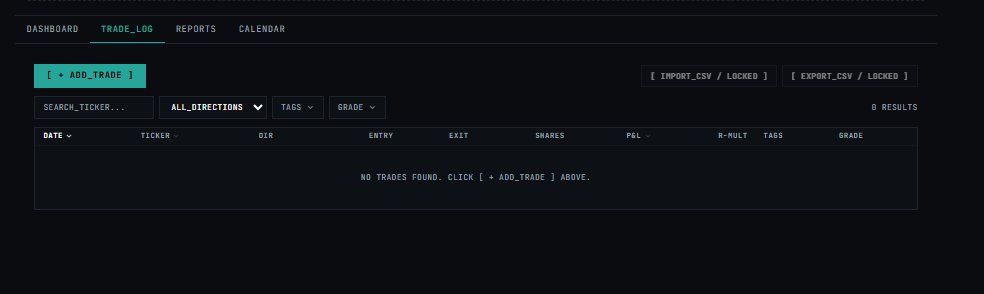
The Trade Log is the primary data entry view — where every individual trade is recorded. Each row is one closed or open trade with full entry/exit detail, P&L, R-multiple, tags, and grade.
Actions¶
| Button | Access | Description |
|---|---|---|
[ + ADD_TRADE ] |
All plans | Open the trade entry form to log a new trade |
[ IMPORT_CSV / LOCKED ] |
Pro+ | Bulk-import trades from a CSV file |
[ EXPORT_CSV / LOCKED ] |
Pro+ | Export all trades as CSV for external analysis |
Import & Auto-Sync System¶
The module supports both manual historical data ingestion and background broker sync operations.
1. Manual CSV Ingestion Pipeline¶
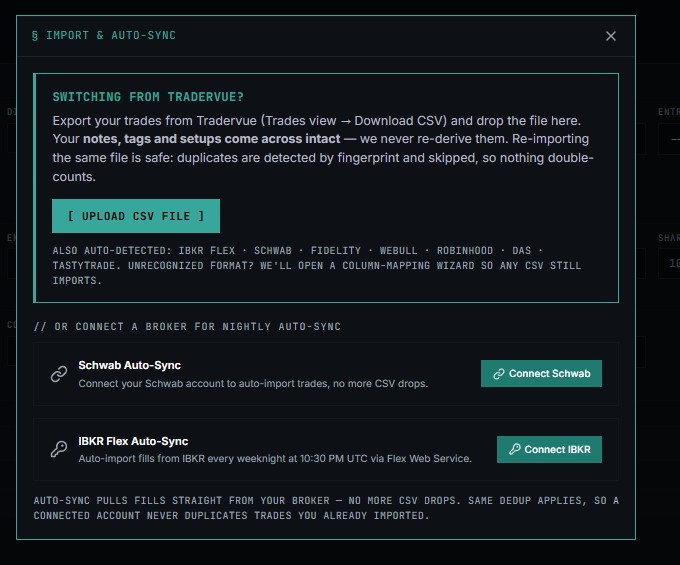
The top portion of the panel handles ad-hoc file uploads, with a particular optimization path for users migrating from legacy platforms.
1.1 Tradervue Migration Path¶
- Export Action: Users can navigate to Tradervue (
Trades view$\rightarrow$Download CSV) to obtain their raw data. - Data Retention: Core metadata including notes, tags, and setups are preserved intact without any background re-derivation.
- Deduping Safeguard: Re-importing identical files is safe. Duplicates are fingerprint-detected and skipped to prevent historical double-counting.
1.2 Supported CSV Formats¶
The importer natively auto-detects standard outputs from the following entities: * IBKR Flex * Schwab * Fidelity * Webull * Robinhood * DAS * Tastytrade
💡 Fallback Exception Handling: If an unrecognized CSV format is dropped or uploaded, the system automatically launches a Column-Mapping Wizard to manually resolve structural schema disparities.
2. Nightly Broker Auto-Sync Configurations¶
For a hands-off workflow, users can link credentials directly to bypass manual CSV exports. The platform auto-syncs straight from the broker data feed while applying the same strict deduping rules.
| Broker Integration | Mechanism / Schedule | Action Link |
|---|---|---|
| Schwab Auto-Sync | Auto-imports completed fills; eliminates CSV file drops. | Connect Schwab |
| IBKR Flex Auto-Sync | Fills are pulled via the Flex Web Service every weeknight at 10:30 PM UTC. | Connect IBKR |
3. Core Deduplication Logic¶
Whether pulling data through automated API triggers or explicit manual user file drops, the ingestion pipeline relies on a unified transaction hashing system:
$$\text{Transaction Hash} = f(\text{Execution Time}, \text{Symbol}, \text{Side}, \text{Quantity}, \text{Price})$$
- If $\text{Hash} \in \text{Database}$, the record is silently discarded to maintain portfolio data integrity.
- This ensures that overlapping automated synchronization and historical manual imports will never duplicate trade records.
Filters¶
| Filter | Options |
|---|---|
SEARCH_TICKER... |
Free-text ticker search |
ALL_DIRECTIONS |
ALL · LONG · SHORT |
TAGS |
Filter by any tag applied to trades |
GRADE |
A · B · C · All |
Results count shown top-right (e.g. 0 RESULTS).
Trade Log Columns¶
| Column | Description |
|---|---|
DATE |
Trade entry date (sortable ↑↓) |
TICKER |
Equity symbol (sortable) |
DIR |
Direction — LONG or SHORT |
ENTRY |
Entry price |
EXIT |
Exit price |
SHARES |
Position size in shares |
P&L |
Realised profit/loss in $ (sortable) |
R-MULT |
R-multiple achieved — actual gain ÷ initial risk |
TAGS |
User-defined tags (e.g. breakout, earnings) |
GRADE |
Self-assessed trade quality: A · B · C |
Trade Journal Configuration & Filter Schema¶
This reference document compiles the complete navigation layout, dropdown menus, filter controls, and taxonomy tags compiled across the Trade Journal UI components.
📋 1. Core Navigation & Global Headers¶
Application Context¶
- Module Identifier:
§01 TRADE_JOURNAL[cite: 1] - Default Metric Array:
0 trades|period=all|source=real[cite: 1] - Global Actions:
[ EXPORT_PDF ][cite: 1]SHARE JOURNAL[cite: 1]
View Filters¶
- Account Mode:
REAL(Dropdown toggle)[cite: 1] - Timeframe:
ALL(Dropdown toggle)[cite: 1]
Primary Navigation Menu¶
- DASHBOARD[cite: 1]
- TRADE_LOG[cite: 1]
- REPORTS[cite: 1]
- CALENDAR[cite: 1]
- PLAYBOOKS[cite: 1]
- AI_ANALYSIS[cite: 1]
- COMMUNITY (Active View Selection)[cite: 1]
🎛️ 2. Main Filter & Control Grid¶
When navigating the core modules, the system uses the following interface parameters for isolating historical trade segments:
[ + ADD_TRADE ]: Launches a modal for manual entry of execution parameters (Ticker, Direction, Entry/Exit Prices, Timestamps, Shares).[ IMPORT / SYNC ]: Opens the multi-broker ingestion interface. As indicated by the tags inimage_2a067b.png, this supports automated integrations with execution platforms like Sterling Trader Pro.[ EXPORT_CSV ]: Dumps the currently filtered table dataset into a standard Comma-Separated Values (.csv) file for external Excel or Python analysis.
2.2 Primary Navigation Menu¶
The navigation tabs control the analytics engine views applied to the underlying trade ledger.
| Tab Name | Purpose / Functionality |
|---|---|
DASHBOARD |
High-level graphical summary of equity curves, win rates, and daily P&L. |
TRADE_LOG |
Active View. The granular data matrix containing row-by-row trade executions. |
REPORTS |
Advanced analytics broke down by strategy, time of day, day of week, or setup. |
CALENDAR |
Visual calendar interface mapping net P&L directly onto trading days. |
PLAYBOOKS |
Rules-based strategy tracker to cross-reference trades against defined setups. |
AI_ANALYSIS |
Machine learning engine that uncovers behavioral biases and optimization ideas. |
COMMUNITY |
Social and collaborative feed for team sharing and review. |
🤖 3. Platform Notification Banners¶
Feed Status Variations¶
- Public Network Status:
PUBLIC_FEED — TRADES SHARED WITH P&L REVEALED. READ-ONLY. FILTER BY SETUP, SYMBOL, OR DATE.[cite: 1] - Empty Community Feed Exception:
NO_TRADES — no public trades match your filters. Be the first: share a trade with P&L revealed.[cite: 1] - Empty Log Query Exception:
NO TRADES FOUND. CLICK [ + ADD_TRADE ] ABOVE.[cite: 1]
🏷️ 4. Unified Tags Taxonomy¶
The multi-select TAGS menu uses strict, color-coded categorization to tracking strategies, mistakes, and market conditions:
🟦 Strategy Setups (Blue Indicators)¶
- Gap & Go: Strategy targeting large opening price gaps.
- VWAP Reclaim: Long setups crossing back over the Volume Weighted Average Price.
- Breakout: Entry on asset clearance above established technical resistance.
- Reversal: Counter-trend strategy identifying local exhausting turning points.
- Momentum: High-velocity trend acceleration follow-through.
- Scalp: High-speed intra-minute micro flips.
- Swing: Positions managed across multi-day/multi-week intervals.
- Earnings Play: Trades triggered off corporate quarterly financial reporting events.
- Short Squeeze: Buying technical breakouts accelerated by short-seller stop coverages.
- Dip Buy: Executing positions on minor technical pullbacks inside robust macro uptrends.
🟥 Discipline & Risk Violations (Red Indicators)¶
- FOMO: Trading out of the Fear Of Missing Out.
- Revenge Trade: Emotional, un-planned execution aimed at recovering previous losses.
- Oversized: Allocating capital size that violates standard risk rules.
- Ignored Stop: Intentionally failing to liquidate position at predefined invalidation price levels.
- Chased Entry: Poor entry execution too far removed from the safe risk/reward threshold.
- No Plan: Entering the market without any clear pre-planned rules.
- Held Too Long: Retaining a position beyond logical technical targets or exit parameters.
- Sold Too Early: Exiting profitable trades prematurely due to emotional panic before hit targets.
🟪 Market & Asset Characteristics (Purple/Gray Indicators)¶
- High Volume: Assets showing significant anomalous relative daily volume.
- Low Float: Trading high-volatility targets with low outstanding shares available.
- Large Cap: Institutional, high-capitalization stable market listings.
- Small Cap: Volatile micro/small capitalization equities.
- Pre-Market Entry: Orders executed during pre-market liquidity extensions.
- Power Hour: Executions localized in the high-volume closing hour of the market day.
- News Catalyst: Trade configurations built entirely around structural news reports or headlines.
📊 5. Relational Database Data Grid¶
The backend logger structure maps execution records into the following database header fields across the data log grids:
[ DATE ] ➔ [ TICKER ] ➔ [ DIR ] ➔ [ ENTRY ] ➔ [ EXIT ] ➔ [ SHARES ] ➔ [ P&L ] ➔ [ R-MULT ] ➔ [ TAGS ] ➔ [ GRADE ]
¶
[ DATE ] ➔ [ TICKER ] ➔ [ DIR ] ➔ [ ENTRY ] ➔ [ EXIT ] ➔ [ SHARES ] ➔ [ P&L ] ➔ [ R-MULT ] ➔ [ TAGS ] ➔ [ GRADE ]